 Jun 28, 2026 - 0
Minutes read
Jun 28, 2026 - 0
Minutes read
How to Reduce Cloud Cost in 2026
Cloud Cost Optimization
How to Reduce Cloud Cost in 2026: Smart Ways to Lower Your Cloud Bills
Quick answer: To reduce cloud costs in 2026, right-size your resources, buy reserved instances for steady workloads, enable auto scaling, delete unused storage, and monitor spending with cost tools. These steps can cut bills by 20–40% without hurting performance—and most can be set up in a single afternoon.
Opening your monthly cloud invoice shouldn't feel like a gamble. Yet for many teams, that bill keeps creeping higher—idle servers, forgotten storage, and oversized instances quietly drain budgets every single day. If you've ever stared at a charge and thought, "Where did all this money go?", you're not alone. Cloud waste is one of the biggest hidden expenses in modern business.
The good news: most of it is fixable. In this guide, you'll learn exactly how to reduce cloud costs in 2026 with practical, safe steps you can apply today. We'll cover why bills are rising, a clear step-by-step plan, the best optimization strategies, and tips for AWS, Azure, and Google Cloud—all in plain language.
Why Cloud Costs Are Increasing in 2026
Cloud spending keeps climbing for a handful of predictable reasons. Understanding them is the first step toward controlling your bill.
- AI and data workloads: Training and running AI models demand powerful (and pricey) GPUs and large storage volumes. As more teams adopt AI in 2026, compute costs rise fast.
- Idle and forgotten resources: Test servers left running, unattached storage volumes, and old snapshots all keep charging you—even when nobody uses them.
- Over-provisioning: Teams often pick larger instances "just to be safe," paying for capacity they never touch.
- Data transfer fees: Moving data between regions or out to the internet (egress) adds charges that are easy to overlook.
- Pricing complexity: With thousands of pricing options across providers, it's easy to choose plans that cost more than they should.
According to Flexera's State of the Cloud reports, organizations estimate that roughly 27–32% of their cloud spend is wasted. That waste is exactly where your savings live.
How to Reduce Cloud Cost in 2026 (Step-by-Step)
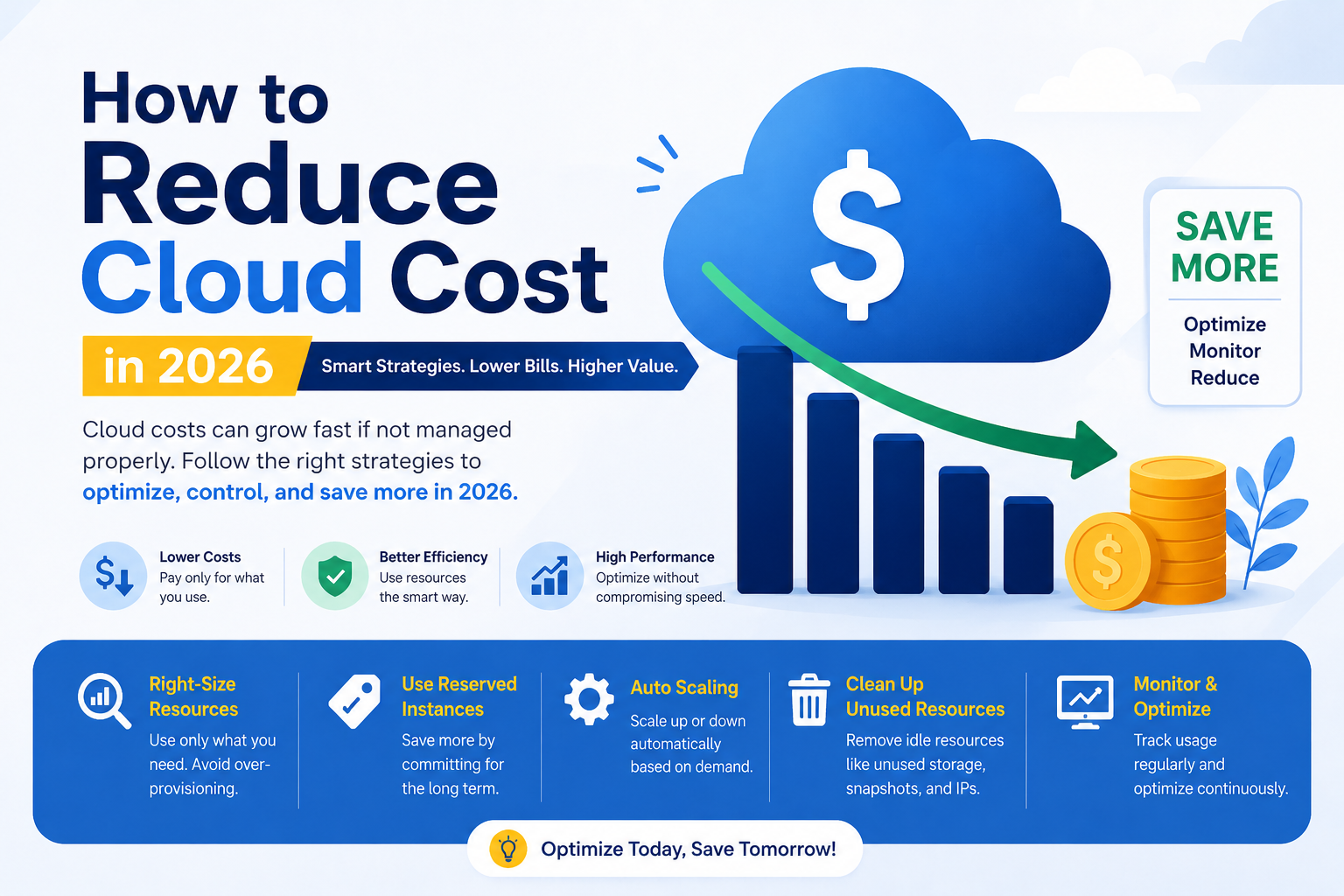
Follow this practical sequence to bring your bill under control. Start at the top and work your way down.
Step 1: Audit your current spending
You can't fix what you can't see. Open your provider's cost dashboard and review where money goes by service, region, and team. Look for surprises—a storage bucket or database that costs far more than expected is a clear target.
Step 2: Find and remove idle resources
Hunt down anything that runs without doing useful work: stopped instances still holding storage, unattached volumes, old snapshots, and unused IP addresses. Deleting these is often the fastest money saver, with zero impact on performance.
Step 3: Right-size your resources
Match your instances to actual usage. If a server runs at 10% CPU all day, you're paying for power you don't need. Drop it to a smaller size and watch your bill fall. Right-sizing alone often saves 15–25%.
Step 4: Commit to discounts for steady workloads
For workloads that run consistently, reserved instances or savings plans can cut costs by up to 72% compared to on-demand pricing. The trade-off is a 1- or 3-year commitment, so apply this only to predictable, always-on resources.
Step 5: Automate scaling and scheduling
Turn off development and testing environments at night and on weekends. Use auto scaling so your resources grow during busy periods and shrink when demand drops. Why pay for 10 servers at 2 a.m. when you only need two?
Step 6: Set budgets and alerts
Create spending alerts that email you when costs cross a set threshold. This prevents nasty end-of-month surprises and catches runaway charges early.
Best Cloud Cost Optimization Strategies
These four strategies deliver the biggest wins for most teams. Combine them for compounding savings.
Reserved instances and savings plans
Reserved instances offer deep discounts in exchange for a usage commitment. Choose reserved instances if your workload runs 24/7 and is unlikely to change. For variable or experimental projects, stick with pay-as-you-go to keep flexibility. Many teams use a blend: reservations for the steady baseline, on-demand for the spikes.
Auto scaling
Auto scaling adjusts your compute capacity automatically based on real-time demand. During a traffic surge, it adds servers; when things quiet down, it removes them. This means you pay for what you actually use, not for peak capacity around the clock. It's ideal for web apps and services with uneven traffic.
Storage cleanup and tiering
Storage costs sneak up over time. Delete old snapshots, clear out logs you no longer need, and move infrequently accessed data to cheaper "cold" storage tiers. For example, archiving data to a tier like Amazon S3 Glacier can cost a fraction of standard storage. Set lifecycle rules so this cleanup happens automatically.
Continuous monitoring
Cost optimization isn't a one-time project—it's a habit. Use built-in tools (AWS Cost Explorer, Azure Cost Management, Google Cloud Billing) or third-party platforms to track spending trends. Tag resources by team or project so you can see exactly who spends what, and make someone accountable for the bill.
How to Reduce Costs on Different Cloud Platforms
Each major provider offers its own tools and discount programs. Here's how to save on the big three.
How to reduce costs on AWS
Use AWS Cost Explorer to spot trends and AWS Compute Optimizer to find right-sizing opportunities. Buy Savings Plans for steady compute, move cold data to S3 Glacier, and delete unattached EBS volumes. Spot Instances can save up to 90% for flexible, interruption-tolerant workloads like batch jobs.
How to reduce costs on Microsoft Azure
Turn on Azure Advisor for personalized cost tips and use Azure Cost Management to track spending. Apply Reserved VM Instances and the Azure Hybrid Benefit, which lets you reuse existing Windows Server and SQL Server licenses to lower costs significantly. Shut down idle VMs with auto-shutdown schedules.
How to reduce costs on Google Cloud
Google Cloud rewards steady usage automatically with Sustained Use Discounts, and offers Committed Use Discounts for longer commitments. Use the Recommender tool to find idle resources and right-sizing suggestions. Preemptible (Spot) VMs slash costs for fault-tolerant work, and BigQuery's flat-rate pricing helps heavy data users budget predictably.
Take Control of Your Cloud Bill Today
Reducing cloud costs in 2026 doesn't require a massive overhaul. Start small: audit your spending this week, delete idle resources, and right-size your biggest instances. From there, layer in reserved instances, auto scaling, and regular monitoring to lock in long-term savings.
The teams that win at cloud cost management treat it as an ongoing habit, not a once-a-year cleanup. Pick one strategy from this guide, apply it today, and you'll likely see results on your very next invoice. Your budget—and your finance team—will thank you.
Frequently Asked Questions
Why is my cloud bill so high?
Your bill is likely high because of idle resources, oversized instances, and forgotten storage. Many teams pay for servers running at low usage or volumes nobody touches. The quickest fix is to audit your spending dashboard, delete unused resources, and right-size anything bigger than it needs to be.
What is the best way to reduce cloud cost?
The single most effective step is right-sizing your resources to match actual usage. Most teams over-provision and pay for capacity they never use. Combine right-sizing with reserved instances for steady workloads and auto scaling for variable traffic, and you'll capture the bulk of available savings.
How can small businesses save money on cloud services?
Small businesses save most by turning off non-production environments after hours and using budget alerts. Schedule development and test servers to shut down nights and weekends, since you rarely need them then. Also set spending alerts so a surprise charge never catches you off guard.
Is reserved instance better than pay-as-you-go?
Reserved instances are better for predictable, always-on workloads, while pay-as-you-go suits variable or short-term needs. Reservations can cut costs by up to 72% but require a 1- or 3-year commitment. Use reserved pricing for your steady baseline and on-demand for unpredictable spikes to balance savings and flexibility.
Which cloud platform is cheapest in 2026?
There's no single cheapest platform—it depends on your workload. Google Cloud offers automatic sustained-use discounts that benefit steady usage, AWS provides the widest range of discount options, and Azure shines if you already own Microsoft licenses thanks to the Hybrid Benefit. Compare pricing for your specific needs rather than picking on price alone.