 Jul 07, 2026 - 0
Minutes read
Jul 07, 2026 - 0
Minutes read
Meta Ray-Ban Display: Features, Price, Design & Everything You Need to Know
Meta Ray-Ban Display
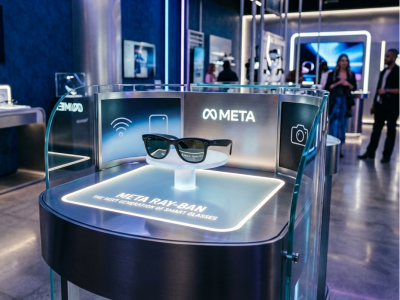
Meta Ray-Ban Display is Meta's next-generation smart glasses upgrade, adding a small heads-up display (HUD) to the existing Ray-Ban Meta smart glasses. The display lets users see AI responses, notifications, and key information without looking at a phone—making everyday tasks faster, safer, and more hands-free.
Upgrading your glasses shouldn't feel like a gamble—especially when the technology is still so new. Plenty of people are drawn to the idea of smart glasses but worry about whether they're practical, comfortable, or worth the investment. Those are fair concerns, and they deserve honest answers.
This guide covers everything you need to know about the Meta Ray-Ban Display: what it is, how it works, what it can do, and whether it's the right fit for your lifestyle. By the end, you'll have a clear picture of the technology, its real-world benefits, and who stands to gain the most from wearing it.
What Is Meta Ray-Ban Display? An Overview of the Latest Technology
Meta Ray-Ban Display refers to the upgraded version of Meta's Ray-Ban smart glasses line—one that moves beyond audio-only features to include a small, integrated heads-up display (HUD). Developed in partnership between Meta and EssilorLuxottica (the parent company of Ray-Ban), these glasses are part of Meta's long-term push toward mainstream augmented reality (AR) wearables.
The display panel sits in the lower corner of the right lens and projects a small, low-profile visual overlay. This is not a full AR headset experience—the display is intentionally minimal, designed to surface just enough information to be useful without overwhelming the wearer. Think of it as the difference between a smart watch glance and staring at a full screen.
Meta first revealed expanded display capabilities as part of its roadmap for the Ray-Ban Meta smart glasses, positioning the Display model as a stepping stone toward more capable AR glasses. The glasses retain the classic Ray-Ban aesthetic, which has been central to the product line's mainstream appeal since the original Ray-Ban Meta glasses launched in 2023.
Meta Ray-Ban Display Features: Display, AI, Camera, Audio & Smart Functions
What does the heads-up display show?
The built-in display is designed to surface contextual, glanceable information rather than full visual experiences. Users can view incoming notifications, AI-generated responses, navigation prompts, song information, and call details—all without pulling out a phone. The visual output is intentionally compact, keeping the user present in the real world while still delivering useful data.
How does the AI integration work on Meta Ray-Ban Display?
Meta AI is baked directly into the glasses and activated by voice. Users can ask questions, get real-time translations, request directions, or have the AI describe what the camera is seeing—and receive a text or spoken response through the display and built-in speakers. This hands-free AI access is one of the most distinctive aspects of the Meta Ray-Ban Display experience.
Camera and video capabilities
The Meta Ray-Ban Display includes a 12-megapixel ultra-wide camera, consistent with other models in the Ray-Ban Meta lineup. Users can capture photos and video from a first-person perspective, making the glasses particularly useful for content creators, travelers, and anyone who wants to document experiences without holding a device. Video can be streamed live to Facebook and Instagram.
Audio system
Open-ear speakers are integrated into the frame, delivering audio without blocking environmental sound. This means wearers can take calls, listen to music, and hear AI responses while remaining fully aware of their surroundings—a meaningful safety benefit for cyclists, runners, and commuters.
Additional smart functions
- Voice-activated controls for calls, music, and AI queries
- Touch controls on the temple for quick adjustments
- Multipoint Bluetooth connectivity
- IPX4 water resistance
- Up to 4 hours of active use per charge (with additional charges via the included case)
How Does Meta Ray-Ban Display Work? AI, Smart Assistant & Everyday Uses
The core interaction model is simple: say "Hey Meta," and the built-in AI assistant activates. From there, you can ask it to do almost anything a smartphone assistant can do—answer questions, set reminders, translate phrases, identify objects, or describe what the camera sees.
What makes the Display version different from standard Ray-Ban Meta glasses is that responses can appear visually on the HUD rather than only through audio. This matters in noisy environments, during workouts, or any situation where listening to a spoken response isn't practical.
Real-world use cases include:
- Navigation: Receive turn-by-turn directions as a visual overlay without looking at a phone
- Translation: Point the camera at foreign-language text and get a real-time translation displayed in the lens
- Messaging: See incoming messages and reply by voice
- Content creation: Record hands-free video and stream live to social media
- Accessibility: Audio descriptions and visual prompts make the glasses a genuinely useful tool for users with certain disabilities
The glasses connect to the Meta View app (available on iOS and Android), where users manage settings, review captured media, and customize preferences.
Meta Ray-Ban Display vs. Regular Ray-Ban Meta Smart Glasses: Key Differences
Feature | Ray-Ban Meta (Standard) | Meta Ray-Ban Display |
|---|---|---|
Heads-up display | No | Yes |
AI responses | Audio only | Audio + visual |
Camera | 12MP | 12MP |
Live streaming | Yes | Yes |
Navigation overlay | No | Yes |
Price | ~$299 | Higher (varies by model) |
Form factor | Classic Ray-Ban | Classic Ray-Ban |
The standard Ray-Ban Meta glasses are excellent for audio-first users—those who primarily want hands-free calls, music, and basic AI queries. The Display model adds a meaningful layer of functionality for users who need visual confirmation of information or operate in environments where audio isn't practical.
Benefits and Limitations of Meta Ray-Ban Display
What are the main benefits of Meta Ray-Ban Display?
Hands-free convenience: The biggest draw is being able to access information, communicate, and navigate without touching a phone. For commuters, athletes, and busy professionals, this adds real daily value.
Subtle design: Unlike AR headsets that signal "tech person wearing a gadget," the Ray-Ban frame looks like regular eyewear. This matters for wearers who don't want to stand out in professional or social settings.
Integrated Meta AI: Having an AI assistant that can see what you see—and respond visually—goes beyond what most wearable tech currently offers at this form factor.
Safety: Keeping your eyes up and your phone in your pocket reduces distraction, particularly while walking, cycling, or commuting.
What are the current limitations of Meta Ray-Ban Display?
Display size: The HUD is intentionally small and positioned in one corner. This is a deliberate design choice, but it limits how much information can be shown at once.
Battery life: Active use is capped at around four hours, which may not cover a full day without the charging case.
Privacy considerations: A camera built into glasses raises legitimate questions about recording in public spaces. Meta includes an LED indicator that lights up when the camera is active, but public awareness of this feature remains limited.
Not a full AR experience: Users expecting an immersive overlay similar to science fiction depictions of AR will find the Display more modest in scope. It is a productivity tool first, not a visual experience platform.
Who Should Buy Meta Ray-Ban Display? Creators, Professionals & Everyday Users
Content creators and social media users
The first-person camera, live streaming capability, and hands-free operation make these glasses a natural fit for creators who want authentic, immersive content without holding a camera. Travel vloggers, fitness influencers, and lifestyle creators are an obvious target market.
Professionals on the move
Sales professionals, field workers, and consultants who need quick access to information without interrupting a conversation or a task will find the AI integration and visual display genuinely useful. The ability to glance at a message or direction without breaking eye contact in a meeting is a small but real professional advantage.
Commuters and outdoor enthusiasts
Cyclists, runners, and urban commuters benefit from both the safety of keeping eyes forward and the convenience of audio navigation and real-time information. The IPX4 water resistance adds durability for outdoor use.
Everyday users looking for simplicity
The glasses also appeal to people who simply want a less screen-dependent daily experience. If the goal is fewer phone check-ins and a more present, connected life, the Meta Ray-Ban Display supports that shift without requiring a dramatic behavior change.
The Bottom Line on Meta Ray-Ban Display
Meta Ray-Ban Display represents a clear step forward in wearable technology—not because it reinvents the glasses form factor, but because it makes AI and smart functions genuinely wearable for everyday life. The display is subtle, the design is familiar, and the functionality is meaningfully broader than standard smart glasses.
For creators, commuters, and professionals who want hands-free access to information without sacrificing style or comfort, the Meta Ray-Ban Display delivers. For users who want full AR immersion or all-day battery life, it is worth watching the product category evolve before committing.
Smart glasses are moving fast. The Meta Ray-Ban Display is one of the clearest signals yet that the technology is getting practical enough for mainstream adoption—and comfortable enough to actually wear.
Frequently Asked Questions
What is Meta Ray-Ban Display?
Meta Ray-Ban Display is an upgraded version of the Ray-Ban Meta smart glasses that includes a small heads-up display (HUD) built into the lens. Unlike the standard model, which relies solely on audio output, the Display version can show visual information—such as AI responses, messages, and navigation prompts—directly in the wearer's field of view. It combines the classic Ray-Ban aesthetic with hands-free smart functionality.
How does Meta Ray-Ban Display work?
Meta Ray-Ban Display connects to your smartphone via Bluetooth and responds to voice commands through Meta AI. Say "Hey Meta" to activate the assistant, then ask questions, request directions, or send messages—and responses appear on the built-in display or through the open-ear speakers. The Meta View app manages settings, media, and preferences, keeping setup straightforward.
Does Meta Ray-Ban Display have a built-in screen?
Yes—Meta Ray-Ban Display includes a small heads-up display (HUD) in the lower corner of the right lens. The display is intentionally compact, showing glanceable information rather than a full visual overlay. This keeps the experience lightweight and practical without the bulk of a traditional AR headset.
What features are available on Meta Ray-Ban Display?
Meta Ray-Ban Display includes a heads-up display, Meta AI integration, a 12-megapixel camera, hands-free calling, music playback, live streaming to Facebook and Instagram, voice controls, IPX4 water resistance, and open-ear speakers. The AI assistant can also identify objects, translate text, and describe visual scenes captured by the camera—making it one of the more capable smart glasses available today.
Is Meta Ray-Ban Display worth buying?
Meta Ray-Ban Display is worth buying if you regularly need hands-free access to information, create content, or want a more phone-free daily routine. The combination of a discreet design and practical AI features sets it apart from other smart glasses. That said, users expecting full AR immersion or extended battery life beyond four hours of active use may want to wait for future iterations.
